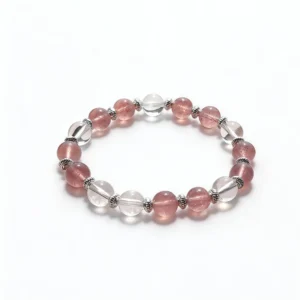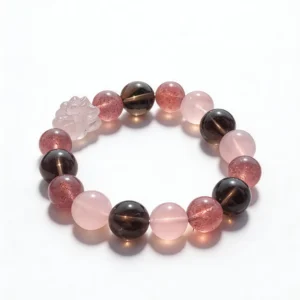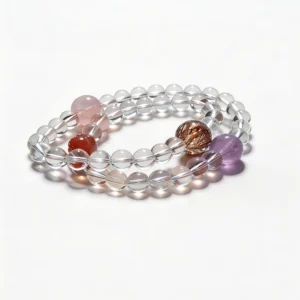


A short bracelet video can be useful for style research when you separate visible design details from captions, filters, and sales language. Pause the clip, map the color sequence, estimate bead scale, note surface finishes and hardware, then compare those observations with a specific product listing. The goal is to understand the design before choosing a bracelet from a fast-moving trend.
Define the Look You Want to Recreate
Start by naming the visible design rather than the claimed effect. Is the video showing one strand, a multi-bracelet stack, a charm bracelet, or a repeated bead pattern? Note the dominant color family, the lightest and darkest elements, the apparent bead diameter, and any metal details.
Save the video URL, creator name, posting date, and time stamp for the clearest wrist view. A saved source helps when a later product listing uses different images or the video links to several items. Record only what the frame actually shows.
Map the Palette by Hue and Value
Break the bracelet into color families first, then compare how light or dark each bead appears. A strand may use several pink tones, a pale translucent spacer, and one deep red focal bead. Writing that sequence is more precise than calling the entire piece pink.
Choose one connecting feature if the video shows a stack. Repeated white beads, one metal color, or a gradual move from pale to dark can make separate strands look related. Review the QZZEN crystal bracelet collection with the same palette notes instead of comparing product thumbnails from memory.
Separate Transparency From Screen Brightness
Opaque, translucent, and transparent beads interact with light differently. Look for visible depth at the bead edge, internal features, reflections on the polished surface, and the way neighboring colors show through. Screen brightness can make a pale opaque bead appear more translucent than it is.
Compare several frames from the same clip. A bead that stays flat and evenly bright as the wrist turns may be affected by editing or direct light. This observation does not identify the material, but it helps define which listing photographs are useful for matching the visual result.
Estimate Bead Diameter With a Reference
A close camera position can make small beads appear large. Use a watch band, clasp, charm, fingertip, or stated measurement as a rough reference only when both objects sit near the same plane. Perspective makes objects closer to the lens look larger.
Confirm the final choice using listed dimensions. Compare 6 mm, 8 mm, 10 mm, and 12 mm measurements directly rather than treating a wrist shot as exact scale. The QZZEN size guide provides a separate method for recording wrist circumference before selecting a finished bracelet size.
Count Beads and Identify the Pattern
Pause on a full circular or flat-lay view and count visible beads. Note whether the design repeats in pairs, alternates two materials, groups colors, or uses a single focal section. If part of the bracelet is hidden, mark the count as incomplete rather than assuming the unseen sequence.
Bead count depends on bead diameter, wrist size, spacers, charms, and construction. Two bracelets with the same main material can have different counts and spacing. Use the pattern as a layout reference, not as proof that two products are the same item.
Compare Polish, Facets, and Surface Detail
Polished rounds produce broad moving highlights. Faceted beads create smaller flashes as each face changes angle. Matte surfaces scatter light, while carved components add grooves and edges. Capture one frame for the overall finish and another for the clearest surface detail.
Compression can blur fine texture or create blocks around bright highlights. Look across multiple frames before deciding that a mark belongs to the bead. Product pages should provide still photographs that show polish, drill openings, inclusions, coatings, or carving more clearly than a moving clip.
Locate Charms, Spacers, and Hardware
Record the position of every non-bead element. Note whether a charm hangs from a ring, sits between spacers, or forms a fixed center. Identify the visible hardware color without assuming composition. Gold-colored and silver-colored describe appearance unless the listing supplies a specific metal.
Check how the moving piece clears neighboring beads and the wrist. A long charm may rotate out of view in a short clip, and a clasp can be hidden on the underside. Request or find listing images of jump rings, crimps, knots, closures, and attachment points before purchase.
Translate the Wrist Shot Into Fit Notes
Observe where the bracelet rests relative to the wrist bone and hand. Note whether it stays in one position, rotates freely, or slides along the arm. Sleeve shape, watch placement, wrist shape, bead diameter, and camera angle all affect the appearance.
Do not infer the recipient’s size from the creator’s wrist. Record your own measurement using the seller’s method and check whether the listed finished size refers to inner circumference, end-to-end length, or another standard. Fit data should come from measurements, not a visual match alone.
Match the Video to the Exact Listing Variant
Confirm the linked page shows the same color option, bead diameter, charm, hardware color, and strand type seen in the clip. A product page may combine reviews, images, or videos from multiple variants. Record the selected option and its SKU when one is available.
Compare the video date with current listing details. Price, availability, packaging, and store terms can change. Read the information shown during the actual transaction and save the selected variant before checkout rather than relying on an older caption or comment.
Use a Short Design-Decoding Checklist
- Source URL, creator, posting date, and useful time stamps
- Single strand or stack, plus the order of visible pieces
- Hue, light-to-dark sequence, and apparent transparency
- Approximate bead diameter and the reference used
- Visible bead count, repeat pattern, and focal section
- Polished, faceted, matte, carved, or coated appearance
- Charm, spacer, clasp, ring, knot, and hardware positions
- Exact listing variant, stated materials, size, and SKU
Complete the same checklist for two or three candidates in the QZZEN shop. Consistent fields make design differences easier to see and keep a dramatic clip from outweighing missing product information.
Compare the Received Bracelet With the Map
- Photograph the full bracelet under ordinary light.
- Confirm the selected color, bead diameter, hardware, and charm.
- Compare the visible sequence with the saved product listing.
- Inspect drill openings, cord, knot, clasp, rings, and attachments.
- Record normal variation without claiming an unsupported identity.
- Contact the seller promptly when a received detail differs from the order.
A saved style map gives the arrival check a factual reference. Avoid scratching, forceful pulling, chemical exposure, or other destructive tests. Product condition and construction can be documented without damaging the bracelet.
Create With QZZEN
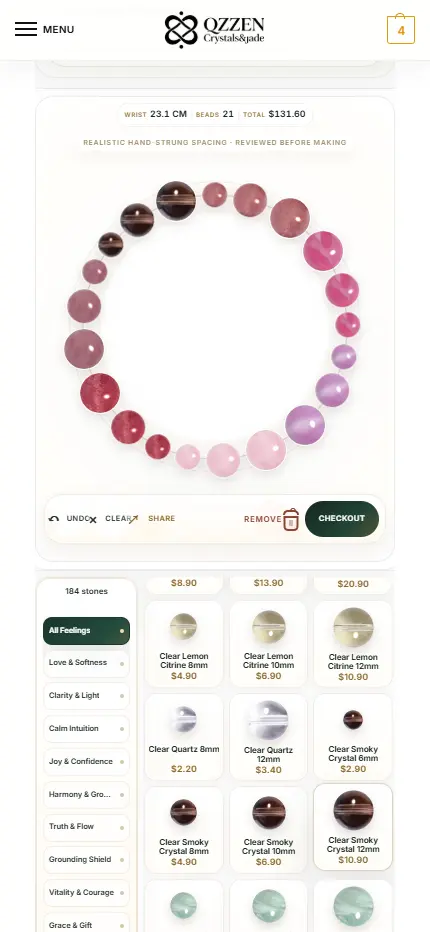
Turn the Video Style Map Into a Bracelet Preview
Use QZZEN Create to arrange a complete circular layout from your color, bead-size, pattern, and wrist-measurement notes. Review the sequence as one finished bracelet before deciding whether it matches the short-video look you recorded.